How to Make a Raindance AI Video
Upload a clear photo of each person to Raindance AI, choose Duo and the Pier at Sunset template, and generate an 8-second clip, which takes about three minutes. Then open it in TikTok or CapCut and add “Raindance” by Dave and Tems from the sound library. Solo works the same way with one photo.
By Raindance AI Editorial Team · Updated
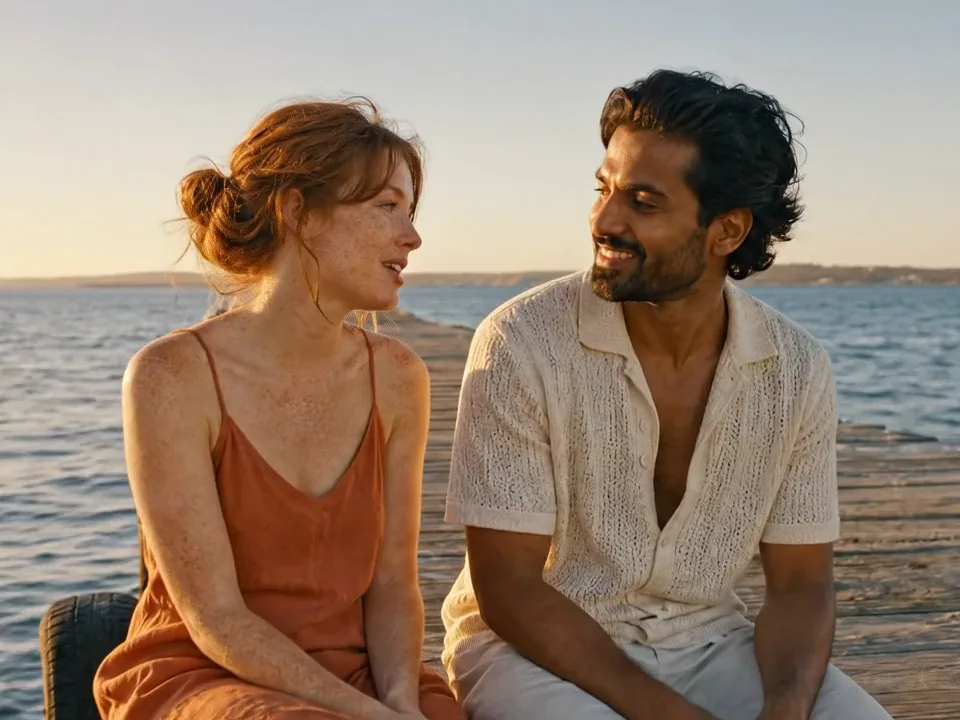

This guide covers how to make a Raindance AI video from start to finish: which photos work, which template to pick, what it costs, and how to add the song so your post joins the trend. Everything below was tested on our own tool on October 3, 2026. Most people who look up how to make Raindance AI video clips want the duet with a partner or a friend, so the steps start there.
How to make a Raindance AI video in 4 steps
- Choose your photos. One photo per person, taken by someone else: front-facing, even light, hands empty, only that person in the frame. No selfies or mirror shots. The tool crops it to your face and hair.
- Pick Duo or Solo and a template. Duo puts two people into a two-person template such as Pier at Sunset; Solo puts one person into a one-person template such as The Orange Room.
- Generate the clip. Press Generate. A Duo clip takes about three minutes and costs 30 credits; Solo takes about a minute and a half and costs 15.
- Add the song and post. Download the MP4, open it in TikTok or CapCut, add Raindance by Dave and Tems from the sound library, keep the 4:3 frame and post.
The rest of this page goes through each step in detail, with the small things that make the difference between a clip that looks like the trend and one that looks like a filter.
What you need
- One photo of each person (two for Duo, one for Solo)
- Permission from everyone in the photos. No celebrities and no minors.
- TikTok or CapCut on your phone to add the song, which is not included in the clip
- 30 credits for a Duo clip or 15 for Solo (see pricing)
Step 1: Choose your photos
The photo decides how much the result looks like you, so this step matters most. Good photos have:
- The face looking at the camera, eyes open, nothing covering it
- Even light, no strong shadow across the face
- Your whole head in the frame, hair included, with a little space around it
- Only one person; crop friends out before uploading
- Taken by someone else, with your hands empty. Selfies, selfie sticks and mirror shots often come back with a phone in your hand
- Any outfit. The tool crops the photo to your face and hair; the scene and the moves come from the template and our engine fills in the clothes
Step 2: Pick Duo or Solo and a template
On the Raindance AI video generator, choose Duo for two people or Solo for one. Upload the photos into the slots: in Duo, “Person on the left” takes the left seat on the pier. Then pick a template. Pier at Sunset is the classic look from the trend. The Orange Room is the Solo template, a slow verse sung to the camera in warm orange light. A rainy-day version of the pier duet is in final checks.
Step 3: Generate the clip
The tool shows the cost before you start: 30 credits for an 8-second Duo clip and 15 for Solo, delivered as a 1280×960 MP4 in 4:3. Press Generate and keep the tab open. Duo takes about three minutes because the two people are swapped one after the other. If anything fails, the credits go back to your balance automatically.
Step 4: Add the song and post
In TikTok
- Tap + and upload the MP4 from your camera roll.
- Tap Add sound and search “Raindance Dave Tems”.
- Pick the official sound, then drag the start point to the line you want.
- Set the original sound volume of the clip to zero if you only want the song.
In CapCut
- Start a new project and import the MP4.
- Tap Audio, then Sounds, and search “Raindance”.
- Add the song, trim it so a sung line starts with the first frame.
- Export at 1080p and post from CapCut or save to your phone.
Music libraries differ by country and account type. If the song is not in CapCut, add it in TikTok when you post instead.
Posting
- Keep the 4:3 frame. The bars above and below are part of the look.
- Tags people use: #raindance #raindanceai #daveandtems #aivideo.
- A short caption works best, for example “us on the pier” or the lyric you lip-synced.
Duo or Solo: which one to make
Pick Duo if you want the version most people post: two people on the pier, trading lines. It works for couples, best friends, siblings, or you and a parent. Pick Solo if you want a close, moody verse sung straight to the camera, or if the other person has not agreed to be in the video. Solo is also cheaper (15 credits instead of 30) and faster, so it is a good way to test how well your photo works before making a Duo clip. Either way, the steps above are all there is to how to make Raindance AI video edits that look like the trend.
Make it look like the trend
- Dress for golden hour. Light linen, warm colours, white or cream shirts photograph well on the pier. Heavy coats and busy patterns look out of place.
- Match the two photos. In Duo, two photos with similar light and framing give a more natural pair than one studio shot and one dark selfie.
- Pick the line before you post. Listen to the song once and choose the line you want the clip to land on; an 8-second clip fits one line of the chorus.
- Keep it short. Post the 8-second clip on its own or put two templates back to back. Longer edits lose viewers before the chorus.
If the result looks off
- The face does not look like you: try a sharper, front-facing photo with even light.
- People are on the wrong sides: swap the two photo slots and generate again.
- A small object in someone’s hand: use a photo someone else took rather than a selfie, and generate again.
That is the whole process. Want to know where the look comes from? Read what the Raindance AI trend is, or copy the scene descriptions from our prompt library.
Questions about making the video
Which photo should go on the left and which on the right?
In Duo mode, "Person on the left" replaces the person on the left of the template and "Person on the right" replaces the one on the right. Swap the photos if you want to change sides.
Why is my outfit different from the template?
The tool crops your photo to your face and hair, which keeps the swap clean. Your face and hair come from your photo, the scene and the moves follow the template, and our engine fills in the outfit, so it can differ from both.
Can I use a selfie?
It is better not to. Our engine replaces the whole person, so selfies and mirror shots often come back with a phone in your hand. Ask someone to take a waist-up photo of you with your hands empty; it also gives the engine more to work with for body shape and clothes.
How do I make the singing match the song?
The people in each template already sing a slow line. In TikTok or CapCut, slide the start of the song until a sung line lands where the mouths move. It does not have to be perfect; the trend posts are not perfectly synced either.
Can I make a Raindance AI video on my phone?
Yes. Open the site in your phone browser, upload photos from your camera roll, generate, save the MP4 and open it in TikTok or CapCut. Nothing needs to be installed.
Can I make a longer Raindance AI video?
Each template is 8 seconds, which fits one line of the chorus. Make two clips with different templates and put them one after the other in CapCut for a longer edit.
Ready? Start with your photos
Duo or Solo, three templates, about three minutes.
Make your Raindance video